


|
|
This section describes fundamental ClearCase UCM concepts:
Projects
Elements, components, and baselines
Activities
Views and streams
Delivering, creating baselines, and rebasing
Reading this section isn't necessary to start working on a UCM project, but it does provide a basis for understanding how UCM works and may be helpful if you need to diagnose problems.
A project is the ClearCase object that defines a set of development policies and a set of configurations used in a significant development effort. Your organization may create a project for each product it develops, for a group of products, for a subset of a product's functionality, or for a product release.
A project's policies govern how developers access and modify sets of source files and directories (called components). To record and configure the development work that proceeds on components, projects use other ClearCase objects:
Baselines
An integration stream
Development streams
Activities
Because ClearCase supports parallel development, different projects can work concurrently with different versions of the same set of source files.
ClearCase stores projects in a data repository called a PVOB (project versioned object base).
Your project manager places files and directories under ClearCase version control (or source control). Files and directories under source control are called elements. Each checked-in revision of an element is called a version. The project manager organizes these elements into components. Usually, components can be built into functional units of software.
To keep track of different configurations of versions, your project manager or integrator creates a baseline, which records one version of each element in a component. In effect, a baseline is a version of a component (Figure 1).
Figure 1 Elements, Components, and Baselines
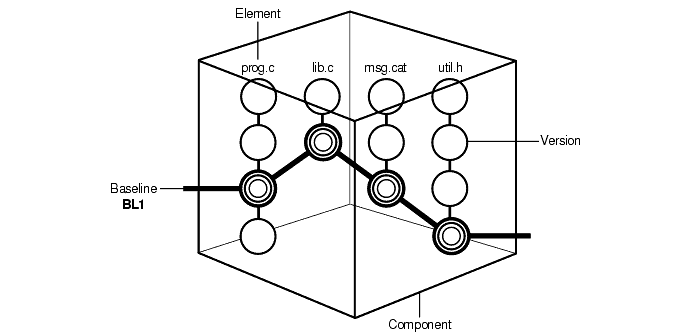
ClearCase stores elements (and their versions) in data repositories called VOBs (versioned object bases); it stores component and baseline definitions in PVOBs. For more information about components, see Managing Software Projects.
To create a version in a ClearCase UCM project, you must first assign it to an activity. An activity is a ClearCase object that identifies the versions created to complete a development task. For example, the versions you create to fix a defect that is stored in your change request management system may constitute an activity. Your organization determines the scope of its activities.
The ClearCase activity object includes a text headline, which describes the task, the user ID of the activity creator, and a change set, which identifies all versions that you create or modify while working on the task (Figure 2).
NOTE: In a project that is enabled for ClearQuest, ClearQuest includes a field to describe the activity owner. This activity owner and the ClearCase activity creator are two different data points; the former is stored in ClearQuest and the latter in ClearCase.

An activity object belongs to a single stream and cannot be moved to another to another stream. (If you assign one or more versions to the wrong activity or if you create new activities to better represent your work, you can assign the versions to a different activity. For more information, see Moving Versions to a Different Activity.)
When you deliver an activity, ClearCase merges the versions in the activity's change set to the integration stream, but does not move the activity object to the integration stream. Instead, it creates an integration activity to identify the versions created as a result of the merge. For more information, see Under the Hood: Integration Activities and Baselines.
In a project that is enabled for ClearQuest, ClearCase links its activity objects to UCM-enabled records in ClearQuest. For more information, see UCM-Enabled Record Types and ClearCase Activities.
To create new versions of elements in a component, you use a view; to keep track of the versions you create, you use a stream.
A view provides a directory tree of one version of each file in one or more components. In the view, you modify source files, compile them into object modules for testing purposes, format them into documents, and so on. ClearCase offers two kinds of views:
Snapshot views, which copy files from VOBs to your computer.
Dynamic views, which provide immediate, transparent access to the data in VOBs. (Dynamic views are not available on all platforms. For more information, see the ClearCase online help.)
An associated stream determines which versions of elements are in the view.
A stream is a long-lived ClearCase object. It is a member of a single UCM project and is a mechanism for creating and recording configurations. A stream identifies the exact set of versions currently available for you to view, modify, or build.
UCM uses baselines and activities to encapsulate a stream's configuration. When you create a stream, its original configuration is the same as a baseline (that is, it identifies a single version of each element in a component). When you create new versions of elements, you assign the new versions to one or more activities. Hence, a stream's configuration is a given baseline plus one or more activities (Figure 3).
Figure 3 A Stream's Configuration
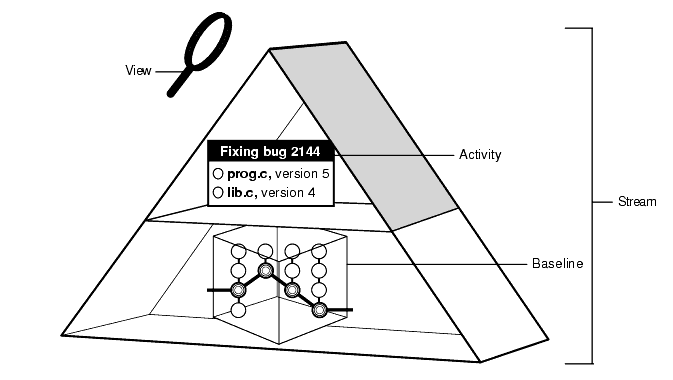
Your view accesses versions of elements provided by a stream. The view you use is said to be attached to the stream. Your view for your private work area is called a development view and the related stream is called a development stream.
The following actions modify a stream's configuration:
Checking in versions from a view attached to the stream. (Multiple views may be attached to a stream.)
Rebasing, which replaces the baseline in the stream's configuration with a more recent one.
Delivering activities, which changes the configuration of the shared work area by adding activities that were previously available only to the contributing development stream. (Delivering activities does not modify the development stream.)
Delivering baselines.
A project includes two kinds of streams: an integration stream and development streams.
A project contains one integration stream, which is the project's main shared work area (Figure 4).
Figure 4 Project Integration Stream
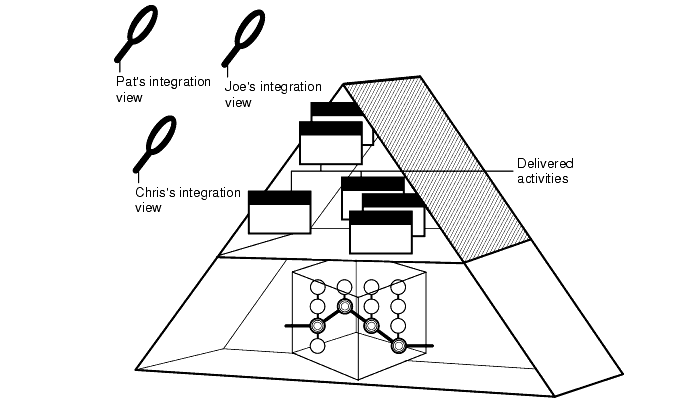
Many integration views can be attached to the project integration stream. The project integration stream records the project's baselines and enables access to all versions of the project's shared elements. It collects all the work that all team members deliver from their development streams.
Typically, each project includes many development streams, one for each developer on the project (Figure 5.)
Figure 5 Many Development Streams
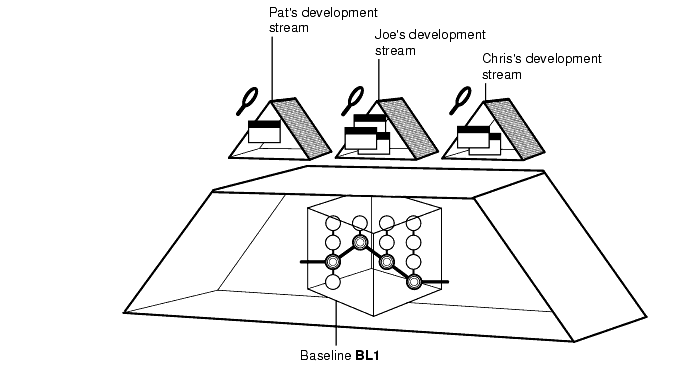
All development streams start from a baseline. As a private work area, your development stream evolves separately from other development streams as you add activities.
In the basic UCM process, the integration stream is the project's only shared work area. However, a project may have additional shared work areas for developers who work together on specific parts of the project. Using the UCM development stream hierarchy feature, the project can have multiple shared work areas.
A project manager can set up a stream hierarchy in which multiple development streams can have child streams. Each parent development stream supports a small team of developers which develops a specific feature. The parent development stream serves as the shared work area for the feature development. For more information about stream hierarchies, see Managing Software Projects.
When you join the project, you can create your development stream under a different parent stream than the integration stream, that is, under a feature-specific development stream.
When you join a project, you specify from which stream you will be working. Typically, you join a project at its integration stream. If your project uses feature-specific development streams, you can join the project at the level of the parent development stream rather than at the integration stream.
The stream at which you join the project becomes the parent stream to your development stream and serves as your shared work area. Therefore, if you join the project at its integration stream, the project integration stream becomes your shared work area.
The integration view that you use is attached to your parent stream. Therefore, the integration view shows the baseline for the parent stream and all delivered activities in that stream.
The parent and child relationship defines the default deliver and rebase relationship between the streams. The default deliver relationship says that the child stream delivers to its default target, its parent stream. The default rebase relationship says that the child rebases with the recommended baselines of the parent stream. The default relationships are not modifiable. However, you can deliver your work to a target stream other than the default target.
When it comes time to deliver your work, by default, you deliver to the parent stream. Periodically, the project integrator incorporates the delivered work into new baselines. Then, you rebase your development stream to the parent stream's new recommended baseline.
If you are working from a parent development stream and all the developers finish working on the feature, they deliver their last work to the parent development stream. The integrator then incorporates their delivered work into a final set of baselines. A parent development stream is an intermediate integration area, the changes in which migrate upward to the integration stream.
You start work from a baseline of your parent stream, which becomes your shared work area. To facilitate delivering activities, you have a separate integration view attached to your parent stream. Your integration view shows the baseline for your parent stream and all delivered activities for that stream. By default, you deliver activities from your development stream to your parent stream. The parent stream is the default target for delivering your work.
If your parent stream is the project integration stream, the default target for your deliver operation is the integration stream (Figure 6).
Figure 6 Delivering to the Integration Stream
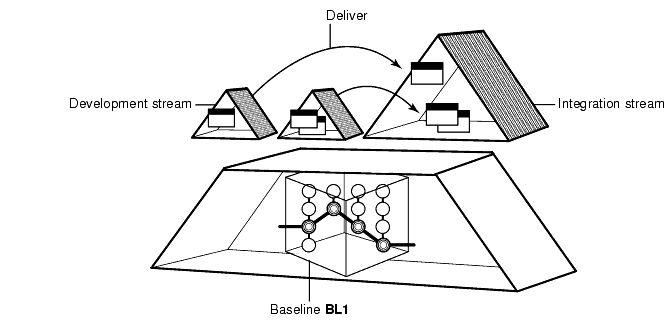
The integration stream identifies a shared set of versions to be used for projectwide building and testing.
If your parent stream is another development stream, the default target for your deliver operation is that development stream (see Your Parent Stream). When you deliver your work, you merge it with the work in your parent development stream rather than with the integration stream. Work from multiple developers is delivered to the parent stream and tested. When all the work in the parent development stream is complete, that work is delivered to its parent stream.
Eventually, the integrators merge all the work from all development streams into the project integration stream.
Integrators incorporate the work delivered to parent streams into new baselines. If the parent stream is the project integration stream, the baseline applies to the child development streams of the integration stream (Figure 7).
Figure 7 Creating a Baseline for the Integration Stream
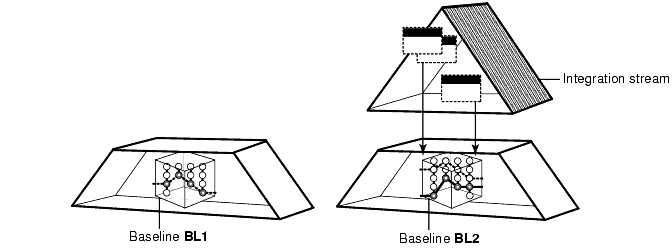
When the integrators build and test these new baselines according to the criteria established for the project, they characterize as recommended the specific baselines that include stable and significant changes. The recommended baseline becomes the new stable configuration for the parent stream. For example, if the integration stream recommends these baselines, they become the required configuration for all development streams whose parent stream is the integration stream. Similarly, for a parent development stream, integrators must recommend new baselines to establish stable configurations for their child development streams.
You update your development work area with a new baseline by performing a rebase operation. This operation merges files and directories from the parent stream to your development stream and allows you to see the new work identified by the recommended baselines. After rebasing, a development work area shows the versions specified by the baseline, plus any of your undelivered activities (Figure 8.)
Figure 8 Rebasing Your Work Area
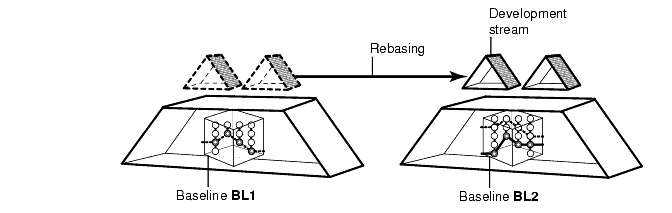
This allows you to stay in sync with other team member's work. By rebasing often, you minimize the overhead of merging excessive numbers of changes.
|
|
Feedback on the documentation in this site? We welcome any comments!
Copyright © 2001 by Rational Software Corporation. All rights reserved. |
