


|
|
Rational ClearQuest is a change-request management system that can integrate with UCM projects to provide extended functionality. This section describes fundamental concepts for the UCM-ClearQuest integration:
ClearQuest schema
UCM-enabled record types and ClearCase activities
Queries
State types and state transitions
Reading this section isn't necessary to start working on a UCM project that is enabled for ClearQuest, but it does provide a basis for understanding how ClearQuest implements the integration and may be helpful if you need to diagnose problems.
ClearQuest stores change requests as records in a database. A schema defines the types of records in the database, the states available to each type of record, and other attributes of the database.
ClearQuest supplies two UCM-enabled schemas: Unified Change Management and Enterprise. Your project manager can set up a custom UCM-enabled schema. To support the UCM-ClearQuest integration, a ClearQuest database must use one of these UCM-enabled schemas.
ClearQuest stores all schemas in a schema repository, which is a master database of schemas. The schema repository does not contain any user-owned data or change request data. Change-request data is stored in a user database.
A UCM-enabled record type is a template for ClearQuest records. It includes definitions for a set of fields that store information about ClearCase activities. Your ClearQuest database may include different UCM-enabled record types for different purposes (such as tracking defects and enhancement requests), and it may include other record types that are not UCM enabled.
In a project that uses the UCM-ClearQuest integration, records based on a UCM-enabled record type can be linked with ClearCase activity objects (Figure 9).
Figure 9 Activities and UCM-Enabled Records
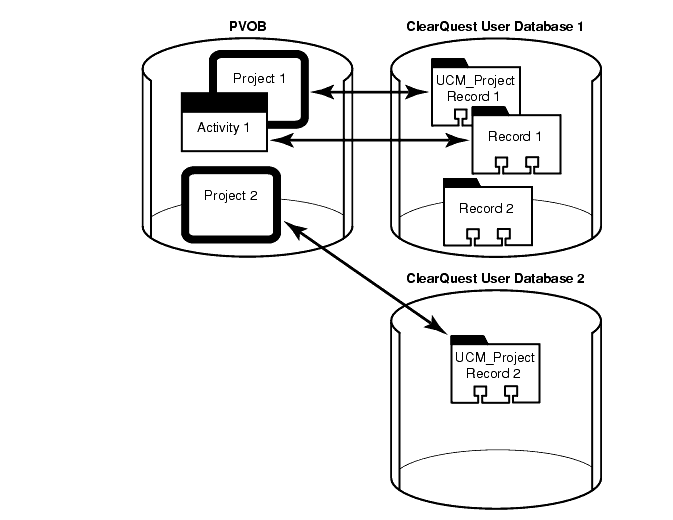
This link enables ClearQuest to display information about the ClearCase activity (such as its change set, its stream, and whether it is currently set in any view). It also enables policies that govern when you can deliver an activity in ClearCase and when you can close an activity in ClearQuest. Because of the close association between linked UCM-enabled records and ClearCase activities, the UCM documentation usually refers to both linked entities as activities.
At any point in a project, your ClearQuest database may contain UCM-enabled records that are not linked to a ClearCase activity object. For example, a newly created record may not be linked to a ClearCase activity. You must explicitly complete an action (for example, by clicking Action > WorkOn in ClearQuest) to link a UCM-enabled record to a ClearCase activity.
Each ClearCase activity in a UCM project that is enabled for ClearQuest must be linked to a ClearQuest record. You cannot create a ClearCase activity object without linking it to a UCM-enabled record in a ClearQuest database.
Queries are the vehicle for navigating through the ClearQuest database. Before viewing or modifying records, you must query the database to find the records you are interested in. For example, you may want to see only activities that are assigned to you or that are associated with your project, or you may want to see activities created before or after a particular date.
A UCM-enabled schema includes a set of queries that you can use to find UCM-enabled records. ClearQuest places the queries into two categories in the ClearQuest Public Queries folder (Figure 10).
Figure 10 UCM-Enabled Queries in ClearQuest
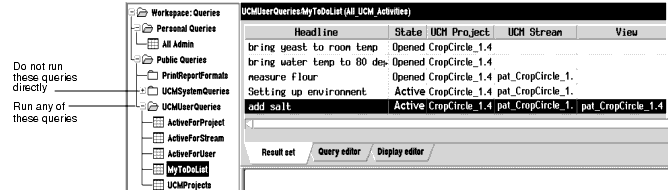
You can run queries in the UCMUserQueries folder and modify them when necessary. You can save in your Private Queries folder any public query that you modify.
Do not run queries in the UCMSystemQueries folder from ClearQuest; they are intended to be run by the ClearQuest and ClearCase system only.
This section describes the following queries:
MyToDoList
UCMCustomQuery1
Other queries
In addition to the queries included in the database schema, you and your project manager can create your own queries.
The MyToDoList query finds UCM-enabled records that match all of the following criteria:
They are assigned to you.
They are in a state whose state type is Ready or Active.
You or your project manager can modify this query.
The UCMCustomQuery1 query finds UCM-enabled records that match any of the following criteria:
In a state whose state type is Ready and match all of the following criteria:
Are assigned to you
Have not yet been assigned to a UCM project
Have not yet been worked on
In a state whose state type is Ready or Active and match all of the following criteria:
Are assigned to you
Have been assigned to the UCM project associated with the current view
Have not yet been worked on
In a state whose state type is Active and match all of the following criteria:
Are assigned to you
Have been assigned to the UCM project associated with the current view
Have been worked on already in the stream to which the current view is attached
The ClearCase checkin and checkout dialog boxes present the activities that UCMCustomQuery1 finds. Although you can also see this query from ClearQuest, it is not designed to be run outside the context of a ClearCase view.
Your project manager can modify this query.
A UCM-enabled schema also supplies the queries described in Table 1. You can run any of these queries.
Query | Description |
|---|---|
ActiveForProject | For one or more specified projects, selects all activities in an active state type. |
ActiveForStream | For one or more specified streams, selects all activities in an active state type. |
ActiveForUser | For one or more specified developers, selects all assigned activities in an active state type. |
UCMProjects | Selects all UCM-project records in ClearQuest user database. |
Change requests move through a pattern, or life cycle, from submission through resolution. In ClearQuest, each stage in this life cycle is called a state, and each movement from one state to another is called a state transition.
As with record types and records, a state type is a template that defines actions and other attributes associated with a state. The states in a UCM-enabled schema must be based on one of the following state types:
Waiting
Ready
Active
Complete
Your project manager may give the states in your UCM-enabled schema different names and may create multiple, different states based on the same state type. For example, your UCM-enabled schema may contain the states Scheduled and Deferred, both of which are based on the Active state type but have different associated actions and meanings.
Schemas include rules for changing records from one state type to the next. Some examples of state transitions are shown in Figure 11.
Figure 11 Example of ClearQuest State Transitions
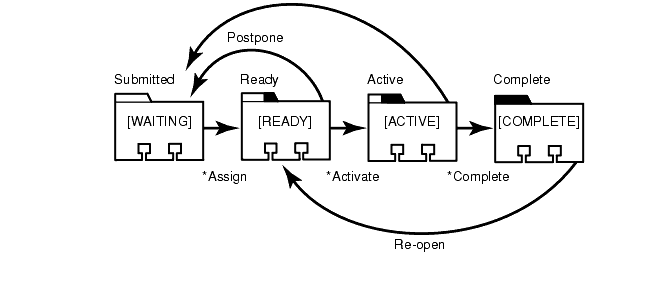
In a UCM-enabled schema, records must follow these state-transition rules:
Waiting. Creating an activity places it in a state based on this state type to indicate, for example, that the work is waiting for someone to resolve dependencies and that it is not ready to be scheduled. Activities in this state do not appear in MyToDoList; they may or may not contain a value in the owner field and may or may not contain a value in the UCM project field. The schema in Figure 11 bases its Submitted and Postpone states on the Waiting state type.
Ready. Assigning an activity usually places it in a state based on this state type to indicate that the work is pending. Activities in this appear in the activity owner's MyToDoList, but are not part of the owner's stream. The schema in Figure 11 bases its Ready and Re-open states on the Ready state type.
Active. Setting your view to an activity usually places the activity in a state based on this state type to indicate that the work is in progress. Setting your view to an activity also links the ClearQuest UCM-enabled record to the ClearCase activity. After the activity is linked, you can change the ClearQuest record's owner but you cannot change the ClearCase stream that contains the activity. For more information, see Reassigning Activities.
The ucm_stream field in a UCM-enabled record displays the stream to which an activity is linked, and the ucm_view field indicates whether an activity is currently set in a view. The schema in Figure 11 bases its Active state on the Active state type.
Complete. When you have completed and delivered an activity, you change it to a state based on the Complete state type. Activities in this state do not appear in MyToDoList, but do remain a permanent part of your stream. The schema in Figure 11 bases its Complete state on the Complete state type.
|
|
Feedback on the documentation in this site? We welcome any comments!
Copyright © 2001 by Rational Software Corporation. All rights reserved. |
