


|
|
Each time you revise and check in a file or directory from a view, ClearCase creates a new version of it. Files and directories under ClearCase control (and all of their constituent versions) are called elements and are stored in VOBs. Figure 2 illustrates a VOB that contains the file elements prog.c, util.h, msg.cat, and lib.c.
Figure 2 A VOB Contains All Versions of an Element

Depending on the size and complexity of your software development environment, ClearCase elements may be distributed across more than one VOB. For example, the elements used by the documentation group are stored in one VOB, while the elements contributing to software builds are stored in a different VOB.
A set of rules called a configuration specification, or config spec, determines which files are in a view.
Config specs for snapshot views contain two kinds of rules: load rules and version-selection rules. Figure 3 illustrates how the rules in a config spec determine which files are in a view.
Figure 3 Config Spec Selecting Versions
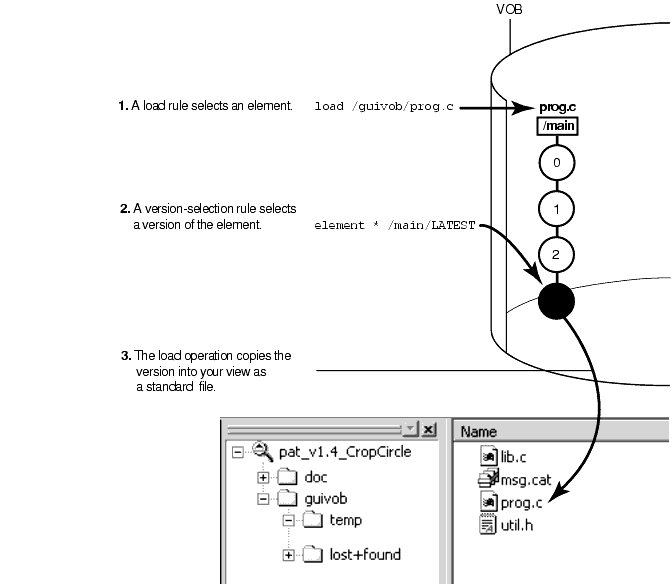
Dynamic views use version-selection rules only (and ignore any load rules). A dynamic view selects all elements in all VOBs activated on your computer, and then uses the version-selection rules to select a single version of each element. Instead of copying the version to your computer as a standard file, the view uses the MVFS (multiversion file system) to arrange the data selected in the VOB into a directory tree.
The rules in the config spec constitute a powerful and flexible language for determining which versions are in your view. For example, version-selection rules can specify the following criteria:
The latest version.
A version identified by a label.
A label is a text annotation that you can attach to a specific version of an element. Usually, your project manager attaches a label to a set of versions that contributed to a specific build. A typical config spec rule uses version labels to select versions:
element * BASELINE_1
For example, if your project manager attaches version label BASELINE_1 to a version of element prog.c, any view configured with this rule selects the labeled version (unless some rule earlier in the config spec matches another version of prog.c).For more information about labels, see Managing Software Projects.
A version identified by a time rule, that is, a version created before or after a specific time.
The version-selection rules are prioritized. For example, the view can try to select a version identified by a label first, and if no such version exists, the view can select a version based on a time rule.
In addition to affecting the way the element appears in views, labeling a version of an element also provides a way to access the version with a version-extended pathname. Labeling a version effectively adds a new hard link to the version in the extended namespace. If you attach version label R4.1A to version /main/rls4/12 of element lib.c, these pathnames are equivalent:
lib.c@@/main/rls4/12
lib.c@@/main/rls4/R4.1A
In addition, a third pathname is usually equivalent:
lib.c@@/R4.1A
This version-extended pathname is valid if it is unambiguous, that is, if no other version of lib.c is currently labeled R4.1A. (This is usually the case because, by default, label types are restricted to being used once per element. See the description of the -pbranch option in the mklbtype reference page in the Command Reference.)
Usually only one or two members of your software team learn the syntax for these rules and create config specs for everyone on the project to use. For more information, see Managing Software Projects and the config_spec reference page in the Command Reference.
In addition to versions of source files, a view also contains file-system objects that are not under ClearCase source control, such as temporary files that you create while developing your source files. These non-ClearCase file system objects are called view-private files and view-private directories.
Figure 4 shows the pat_v1.4_cropcircle view with the objects labeled.
Figure 4 A View Contains Versions of Elements and View-Private Objects

|
|
Feedback on the documentation in this site? We welcome any comments!
Copyright © 2001 by Rational Software Corporation. All rights reserved. |
