


|
|
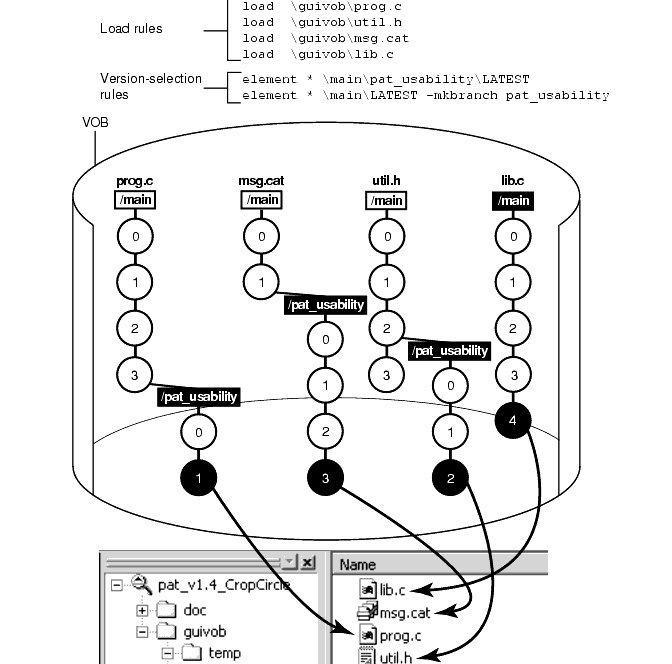
Your organization's policies may dictate that each development project use its own branch to isolate its changes from other development projects. To adhere to this policy, each member of a project team uses a view whose config spec specifies this information:
The versions to select in the development project's specific branch. As Figure 22 illustrates, some or all source files for the project have at least one version on the specified branch. If an element does not have a version on the specified branch, other rules in the config spec select a version of the element. In Figure 22, because lib.c does not have a version on the pat_usability branch, the view selects the version on the main branch.
A special make branch rule. When this view checks out a version, the make-branch rule creates the development project's branch (if it doesn't already exist).
For example, each member of the project team that is optimizing the database schema uses a view that selects versions on the db_optimize branch and creates new versions on that branch.
Figure 22 Elements Have Common Branches
For more information about branches, see Managing Software Projects and the mkbranch reference page in the Command Reference.
ClearCase commands and documentation use a notation to specify a version of an element on a branch. For example, util.h@@\main\2 specifies version 2 of util.h on the main branch; util.h@@\main\r1_bugs\bug404\1 specifies version 1 of util.h on the bug404 subbranch below the r1_bugs subbranch, which is below the main branch (Figure 23).
Figure 23 Version-Extended Pathnames

From a command-line interface, you can use version-extended pathnames to access versions other than the ones currently selected by your view. To view the contents of a version that is not currently in a snapshot view, you must use the cleartool get command in addition to version-extended pathnames.
For a full description of the syntax for version-extended pathnames, see the pathnames_ccase reference page in the Command Reference.
|
|
Feedback on the documentation in this site? We welcome any comments!
Copyright © 2001 by Rational Software Corporation. All rights reserved. |
