


|
|
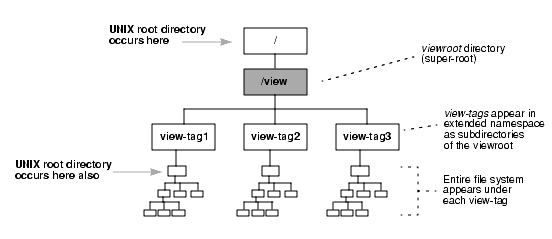
When the MVFS is active on a client host, a /view directory, the viewroot, is created. This directory functions as a mount point for the MVFS namespace (see Figure 44). The /view directory causes the root directory to contain itself recursively, which makes certain recursive pathnames valid. For example:
/view/alpha/view/beta/view/alpha/view/gamma/usr/src/lib
As a result, commands that traverse the entire directory tree, starting at the UNIX root directory ( / ), loop infinitely. In particular, many UNIX systems configure the root user to have a daily crontab(1) script that performs a cleanup on the file-system tree. If the script uses a find / command, it runs the risk of looping infinitely.
NOTE: This situation applies equally to commands and programs executed by any user, either interactively or through a script.
Figure 44 Directory as a Super-Root
The ClearCase installation script, install_release, analyzes the crontab file of the root user on a client host. It modifies entries in this file to prevent the recursive traversal problem (or displays a message warning that it cannot perform the modification).
After installation, verify the correctness of the install_release changes. In addition, modify the crontab entries of other users, according to the instructions in Modifying a crontab Entry.
Use the following procedure to analyze and, if necessary, modify all of a host's crontab entries.
Analyze the crontab entries. Determine which entries will encounter the recursion problem:
% su
Password: <enter root password>
# grep "find /" /usr/spool/cron/crontabs/*
/usr/spool/cron/crontabs/root:15 3 * * * find / -name .nfs\*
-mtime +7 -exec rm -f {} \; -o -fstype nfs -prune
In the example above, long lines are broken for readability. In actual crontab files, each entry must be contained on a single physical text line.
Revise crontab entries. You must modify each crontab file in which an offending entry was found. For example:
# su - username | (switch user identity) |
# crontab -l > /tmp/C | (create temporary file with that user's crontab entries) |
# vi /tmp/C | (modify those entries) |
# crontab < /tmp/C | (configure the modified entries) |
During the edit session, change the command containing find / by adding the host-appropriate options. Detailed information on platform-specific options is in the Platform-Specific Guide in online help. It is also a good idea to add comments to the crontab files warning others not to add entries that cause recursive traversal problems.
|
|
Feedback on the documentation in this site? We welcome any comments!
Copyright © 2001 by Rational Software Corporation. All rights reserved. |
